What you need to know about the JPEG format
By teamnext Editorial Team
JPEG or JPG
The question about the difference between JPEG and JPG comes up frequently. The reason is historical. Older DOS and Windows systems allowed only three characters for file extensions. As a result, .jpeg was shortened to .jpg. This convention has remained common in the Windows ecosystem. On macOS, the full extension .jpeg is more widely used. Technically, there is no difference. JPEG and JPG refer to the same format.
In addition, there are other extensions such as .jpe and .jfif. JFIF stands for JPEG File Interchange Format and refers to the formal container structure.
Why the JPEG format is so widely used
JPEG is one of the most widely used image formats. It is primarily used for photographs, but also for graphics and illustrations. Files can be opened and processed across platforms.
Its broad adoption is mainly driven by two factors. First, JPEG enables very efficient compression. Second, it allows flexible control over the trade-off between image quality and file size. This was a key advantage when the format was introduced in 1992. Image editing tools such as Adobe Photoshop offer multiple quality levels for this purpose.
In the early days of the internet, reducing file size was essential for faster transfer. Even though bandwidth is less critical today, this advantage remains relevant.
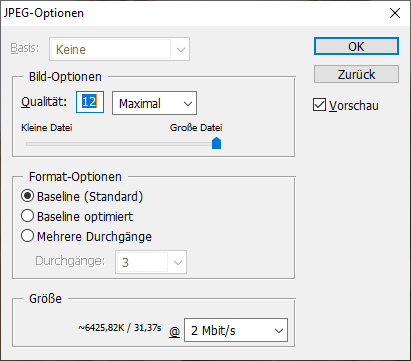
How JPEG compression works
JPEG combines lossless and lossy compression methods. Lossless compression removes only redundant data. Image information remains intact.
Lossy compression reduces image information in a targeted way. This results in data loss. The key question is whether that loss is visible. If there is no visible degradation, the compression is typically acceptable in practice.
JPEG is particularly efficient when image content contains many fine gradients and detailed textures. In these cases, substantial savings are possible without visible artifacts.
Which image types JPEG is suitable for
JPEG is especially suitable for photographs. Many digital cameras use it as a default format. For many use cases, it provides a solid balance between quality and file size.
Photographs typically contain many color nuances and fine details. These characteristics lead to large source files, but also create strong potential for compression.
JPEG is less suitable for simple graphics, logos, or illustrations with sharp edges and few colors. In these cases, compression gains are limited. In addition, strong compression can produce visible artifacts. Typical effects include block patterns and jagged edges around text.
Interim conclusion
JPEG works well for photographs and finely structured images with high color depth. The format supports 24-bit color and therefore 16,777,216 color values. Formats such as TIFF can store higher color depths. However, differences are only visible under professional conditions.
JPEG is not suitable for images that require transparency. The format does not support an alpha channel. For these use cases, PNG or WebP are better options.
Color spaces and color profiles
JPEG is most commonly used in the RGB color space because screen output is based on RGB. However, the format also supports CMYK and can be used for print workflows.
JPEG also supports ICC color profiles. This enables professional color management if all systems involved are correctly configured.
Supported metadata formats
JPEG supports several established metadata standards. This includes IPTC-IIM and XMP for descriptive fields such as title, copyright, and caption.
For technical capture data, Exif is used. Exif stores information such as capture date, camera model, and geolocation. JPEG fully supports Exif.
By comparison, PNG allows embedded metadata but does not support the same standards in the same way. In this respect, JPEG is functionally stronger.
When conversion makes sense
JPEG is generally a final delivery format for digital use. Converting it to formats such as PNG or TIFF usually produces a larger file without adding any information. Lost image data cannot be recovered.
One exception applies to simple graphics with few colors. In these cases, converting to PNG or TIFF can be useful. These formats support indexed color palettes with reduced color depth, which can reduce file size without additional quality loss.
In print workflows, JPEG files are sometimes converted to PDF or TIFF. This is not strictly required, because JPEG also supports CMYK.
Conclusion
JPEG is a suitable format for storing and sharing photographs while keeping file sizes efficient. Files can be opened and edited with built-in tools on common operating systems.
Managing larger media collections typically requires professional media management software. It is important to ensure that all relevant image formats are supported and that conversion options are available where needed.
JPEG was developed more than 30 years ago. WebP is a newer format that offers better compression and supports transparency. However, its lower adoption limits universal use. A long-term shift away from JPEG is possible, but it is not broadly established yet.