What is DPI? What you need to know about point density
By teamnext Editorial Team
In a digital context the term is often misleading, because digital images consist of pixels. Pixel density is the more precise term here. For screens and displays, PPI is commonly used, pixels per inch.
A key misconception should be cleared up immediately:
• Pixel density is not an absolute value.
• Pixel density is a relative resolution.
• Absolute resolution is defined by pixel dimensions.
What do DPI and PPI mean? Examples with numbers
The statement “High quality prints require 300 DPI” is often valid in practice. At a viewing distance of about 25 to 30 cm, 300 DPI usually looks clean and individual dots are not visible.
However a DPI value alone does not describe the size or quality of an image file.
One important point:
• Any digital image can theoretically be output at 300 DPI.
• Pixel dimensions are what matter, not the DPI tag.
Example calculations:
• 300 x 300 pixels at 300 DPI results in 2.54 cm x 2.54 cm.
• 300 x 300 pixels at 30 DPI results in 25.4 cm x 25.4 cm.
• 3000 x 3000 pixels at 300 DPI results in 25.4 cm x 25.4 cm.
• 3000 x 3000 pixels at 3000 DPI results in 2.54 cm x 2.54 cm.
Different image size settings
Screenshots from Adobe Photoshop
• Top section: 300 and 30 PPI with 300 x 300 pixels
• Bottom section: 3000 x 3000 and 30 x 30 pixels with 300 PPI
Key takeaways:
• Changing DPI or PPI does not change pixel dimensions.
• Changing pixel dimensions affects file size.
• Image files do not have an inherent quality defining dot density.
DPI or PPI values can be stored as metadata. They do not matter for file storage. They mainly support calculating output size for print.
For digital display:
• DPI or PPI tags inside image files are irrelevant.
When should dot density be high or low?
The relationship is simple:
• greater viewing distance means lower density
• shorter viewing distance means higher density
Typical print guidelines:
• 300 DPI for flyers, brochures, magazines, viewing distance about 25 to 30 cm
• 100 DPI for posters up to DIN A2, viewing distance up to about 2 m
• 60 DPI for large banners, viewing distance above 2 m
On screens, pixels per inch are determined by the device. This is why a fixed value such as 72 DPI is not a meaningful quality target for web images.
What role does PPI play on screens and displays?
Display resolution has increased significantly. The iPhone 13 Pro is an example with 460 PPI. Individual pixels are hard to see even at close distance.
For comparison:
• a typical 24 inch Full HD monitor, 1920 x 1080, is often around 92 PPI
• a 55 inch 4K TV can be around 80 PPI, depending on the exact panel size
To illustrate the trend, a browser data based statistic can be used. It shows the distribution of common desktop screen resolutions in Germany since 2009.
The chart highlights the shift:
• 1024 x 768 was common around 2009
• 1920 x 1080 became a typical standard by 2022
Why 72 keeps coming up
72 PPI goes back to early Macintosh systems. A 9 inch display with 512 x 342 pixels is roughly 72 PPI.
For digital output it does not matter:
• at 100 percent view, the file pixels are shown 1 to 1
• a DPI tag does not change that
If an image is 600 x 600 pixels, a 100 percent view shows exactly those 360,000 pixels. Scaling only happens when the output size or the device differs.
What does a pixel look like?
Under a microscope a pixel looks like a small light window. A typical display pixel is built from three subpixels:
• red
• green
• blue
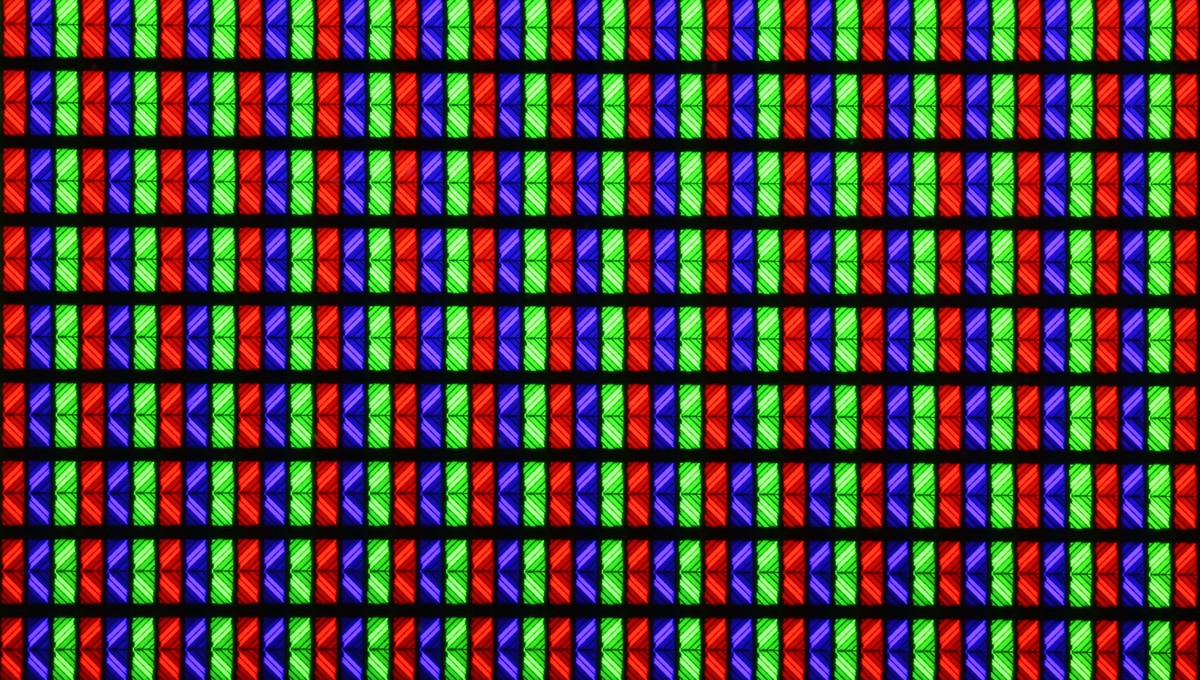
What do DPI values mean when scanning?
For scanning, DPI refers to sampling density. In practice it means pixels per inch, even though DPI is still the common label.
A simple rule:
• higher sampling density captures more detail and creates larger files
Scanning a 300 DPI print at 600 DPI rarely adds useful information. In office use, 300 DPI is often enough. Slides can hold more detail, which is why slide scanners may use four digit values.
What do DPI values mean for a mouse?
For mice, DPI describes sensitivity.
A straightforward interpretation:
• at 600 DPI the cursor moves 600 pixels when the mouse moves one inch
• at 1200 DPI it moves 1200 pixels per inch
An alternative term is CPI, which is used in the same context.
Quick Q and A on DPI and PPI
Do DPI values matter for images on the internet?
• Answer: no.
When do DPI values matter?
• Answer: when preparing files for print, prepress.
Which scan produces a larger file?
• Scan 1: A3 at 300 DPI
• Scan 2: A5 at 600 DPI
• Answer: they are the same size, because the area difference is offset by the sampling density.
Which file is smaller? Trick question.
• File A: 800 x 600 pixels with a 300 PPI tag
• File B: 800 x 600 pixels with no PPI tag
• Answer: File B is slightly smaller, because storing the metadata tag takes a few bytes.