What are vector graphics? And what formats are there?
By teamnext Editorial Team
The key difference between vector and raster formats
Pixel based images are built on a grid. They are therefore called raster graphics. The rule is:
• a larger grid means more pixels
• more pixels usually means larger files
If a raster image contains a circle, you will see jagged edges when you zoom in far enough. The file does not define what a circle is. The shape is only approximated by pixels.
Vector graphics store mathematically describable content. Vectors describe the shape and position of geometric objects. A circle is defined by its center and radius. Additional properties can be defined, for example:
• stroke color
• stroke width
• fill color
• transparency
Absolute sizes do not matter in vector graphics. Elements are described relative to each other. That is why vector graphics can be scaled without quality loss. Zooming does not create jagged edges, except for the pixel grid of the display.
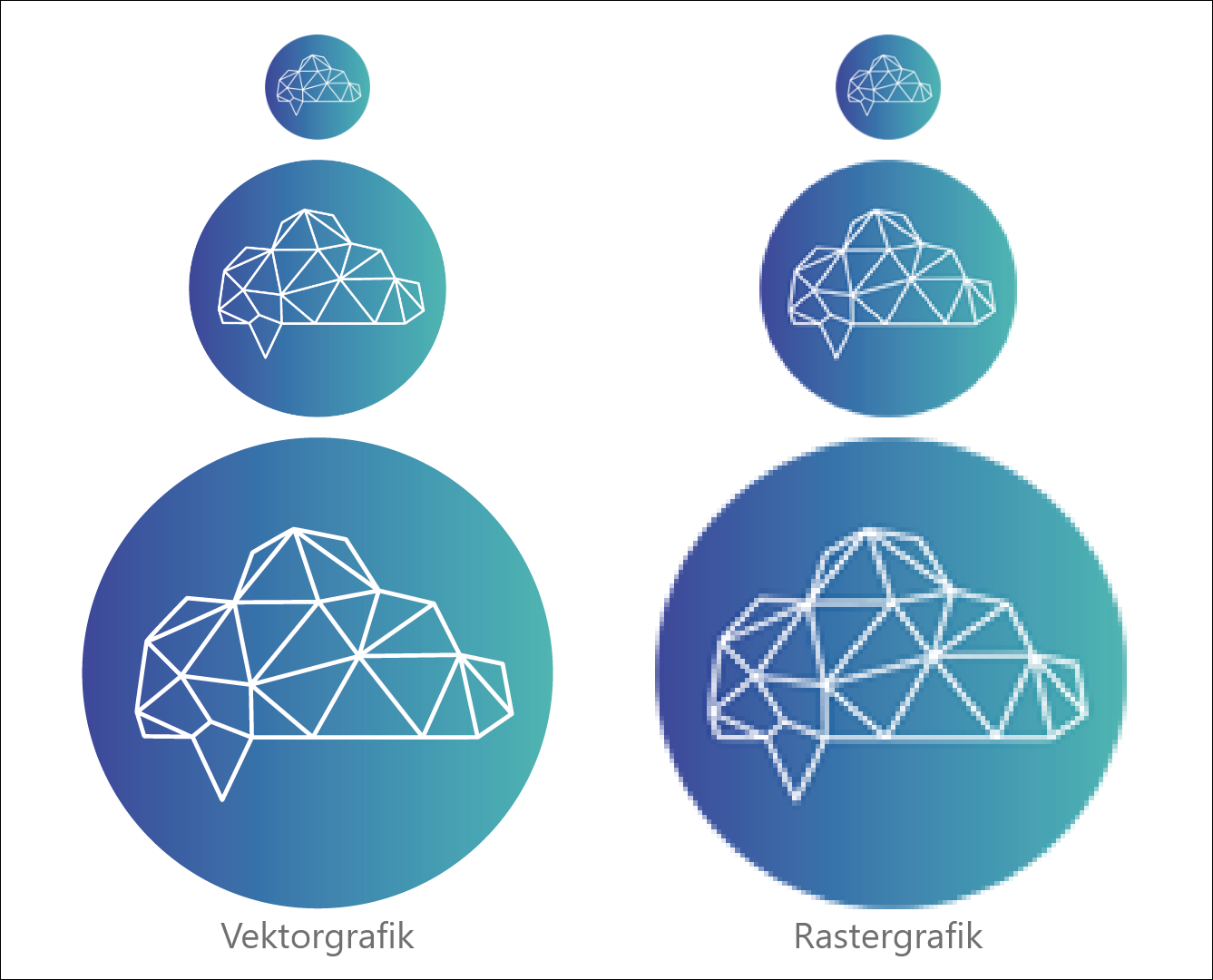
Vector graphics are often smaller in file size because it is more efficient to describe geometry than to store every pixel value.
A limited scope
Vector graphics are suitable when shapes can be described geometrically. Paths and graphic primitives can be represented well, for example:
• lines
• circles
• polygons
Photos, paintings, and hand drawings are different. They contain irregular structures and are typically stored as raster images.
The term vector graphic usually refers to two dimensional content, not to 3D modeling.
The 6 most important vector formats
1. AI, Adobe Illustrator Artwork
AI is a proprietary format from Adobe Illustrator. It supports layers and transparency. AI files can be viewed and edited in a limited way in other applications, for example Adobe Acrobat. Full functionality is available in Illustrator.
2. CDR, CorelDraw File Format
CDR is a proprietary format from CorelDraw. CDR files can be viewed and converted in other programs, for example IrfanView. The source data is typically edited in CorelDraw.
3. SVG, Scalable Vector Graphics
SVG is a standardized format for two dimensional vector graphics. It was designed for responsive use on websites and is based on XML. SVG files can be opened in any browser. Editing typically requires tools such as Illustrator, CorelDraw, or Inkscape.
4. WMF, Windows Metafile
WMF is a Microsoft vector format that can also include raster content. It was designed for Microsoft Office applications and supports exchanging graphics between programs, including via the clipboard. EMF is an enhanced version with additional capabilities, including higher color depth support.
5. EPS, Encapsulated PostScript
EPS is based on PostScript, a page description language designed for publishing and printing. The format was developed by Adobe and is often described as a predecessor of PDF.
6. PDF, Portable Document Format
PDF can contain both vector and raster content. Many PDF documents are mixed:
• text is typically stored as vector data
• photos are embedded as raster images
Note: The F in PDF stands for format. Strictly speaking, PD format would be consistent, but PDF is the established term.
What are vector graphics used for?
Vector graphics are commonly used where scalability and precision matter, for example:
• logos and wordmarks
• infographics
• technical diagrams
• illustrations
• maps and city plans
• fonts
• comics
Which programs can edit vector graphics?
Proprietary formats such as AI and CDR are typically edited in their native applications. Depending on the format, other programs may also work. Inkscape is a widely used free option.
Key tools include:
• Adobe Illustrator, Windows, macOS
• Affinity Designer, Windows, macOS
• Apache OpenOffice Draw, Windows, macOS, Linux
• CorelDraw, Windows, macOS
• FreeHand, Windows, macOS
• Inkscape, Windows, macOS, Linux
• Karbon, Linux
• PhotoLine, Windows, macOS
• LibreOffice Draw, Windows, macOS, Linux
• Synfig, Windows, macOS, Linux
• Xara Designer Pro, Windows
• Xfig, Linux
How are vector graphics created?
There are two main approaches.
Option 1: Create from scratch
The graphic is drawn directly in a vector editor without using an existing image as a base.
Option 2: Vectorize an existing raster image
A raster image is traced manually or vectorized automatically. Typical settings include:
• level of detail
• color depth of the target format
• background transparency