How to build your own image database
By Moritz Bartling
A professional image database is no longer just a tool for photographers. In companies and organizations, image libraries grow fast — from a few thousand files to tens or even hundreds of thousands. Without structure, search becomes slow, quality drops, and legal risk increases.
5 reasons to build an image database
-
less workload for teams (time, resources, clearer processes)
-
better compliance (copyright, releases, privacy)
-
fewer duplicate purchases and duplicate files
-
higher quality in marketing and PR output
-
better ROI from existing media assets
Folder structure vs. image database
Folders are one-dimensional. But images are not. One photo can show a player, a sponsor logo, and an emotion — at the same time.
Typical “folder fixes” fail:
-
Option A: copy the file into multiple folders → duplicates everywhere
-
Option B: force everything into folder/file names → messy and hard to search
An image database is multi-dimensional: one original file, many classifications via metadata, tags, and collections.
What a professional image database looks like
Common building blocks:
-
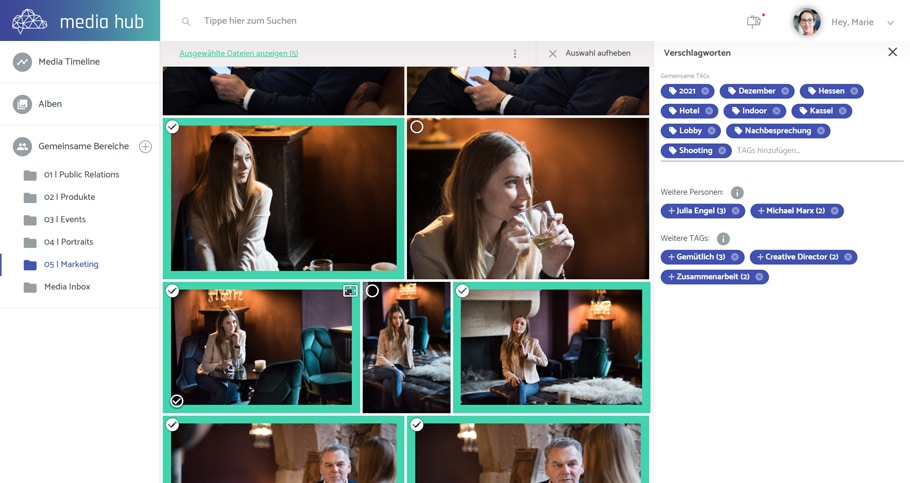
tags / keywords (controlled vocabulary)
-
media type categories (photo, video, graphics, documents)
-
virtual albums / collections (no physical copying)
-
rights and license metadata
-
roles, permissions, approvals
-
AI features: object recognition, people detection, dominant colors, number of people, mood/emotion signals
Define requirements first
Key questions:
-
photos only, or also video, audio, presentations, PDFs?
-
which formats are relevant (JPEG, PNG, TIFF, WebP, AI, SVG, MP4, PDF …)?
-
which metadata standards must be supported (Exif, IPTC, XMP, Dublin Core)?
-
who will use it internally (marketing, PR, sales, HR …)?
-
which external stakeholders need access (agencies, partners, press …)?
-
is rights/licensing management required (stock licenses, releases)?
-
is automatic face recognition needed?
-
any company-specific workflows (approval stages, status, campaign logic)?
-
any extra security/privacy requirements beyond GDPR?
Plan the data structure
This is the foundation. If the structure is wrong, adoption dies.
Best practice: involve different departments to validate the structure early.
Common top-level approaches:
-
time-based (season, year, competition)
-
organizational units (departments, divisions)
-
product or article groups
-
content types (press, projects, logos, templates …)
There is no universal “right”. Only “right for daily work”.
Build a keyword catalogue
Keywords make search work. A practical approach:
-
collect terms broadly
-
group them into categories
-
define hierarchy (broader → narrower terms)
-
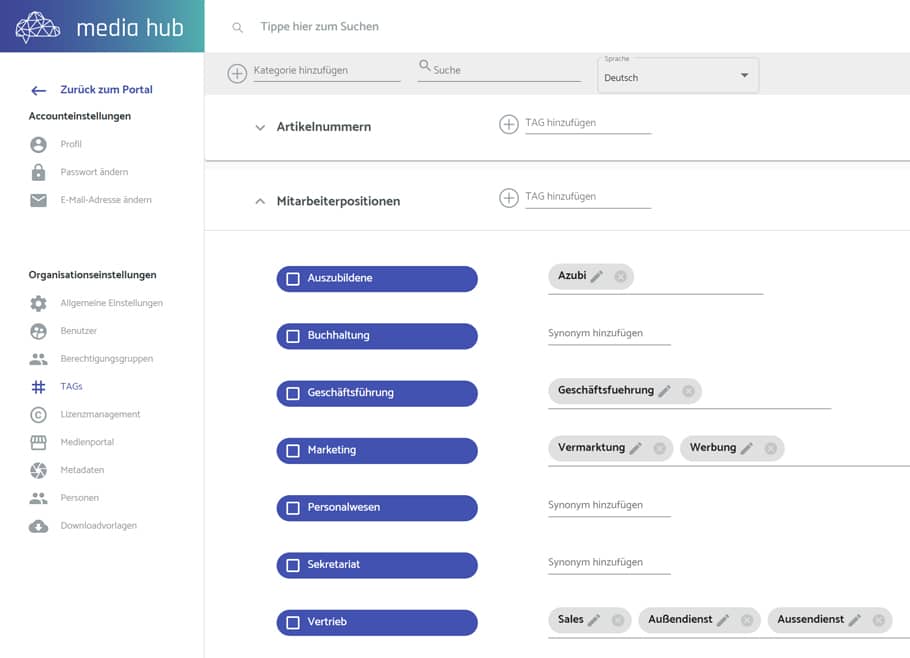
maintain synonyms (Spring ↔ Springtime, USA ↔ United States)
Recommendation: keep hierarchy depth at 2–4 levels. Deep trees look academic but slow teams down.
Example:
-
Season → Spring (synonyms: Springtime) → Summer → Autumn → Winter
-
Location → Germany → Bavaria → Munich …
Import strategy: everything or cleanup?
A clean start saves years later. Do a digital cleanup before importing.
Core question: which images should stay usable long-term?
What makes a “good” image?
Content
-
clear message, easy to understand
-
visible target-group relevance
-
people captured well
-
fits a category (creative / informative / documentary)
Composition
-
solid composition (rule of thirds, symmetry, leading lines, framing)
-
modern visual language (avoid outdated “stock look”)
Technical quality
-
sharp focus where it matters
-
balanced exposure
-
low noise, no compression artifacts
-
usable white balance / color accuracy
-
sufficient resolution (rule of thumb: at least 1 MP — often much more)
-
not heavily upscaled or over-interpolated