The importance of geodata in media management
By teamnext Editorial Team
Photo and video production is growing fast. Campaigns, documentation, employer branding, events. The result is always the same. Media volumes scale faster than folder structures. That is exactly what a DAM system is built for. It stores assets centrally and makes them easy to find. Descriptive metadata like captions and keywords are essential. Technical metadata is just as important. Geo data is part of that.
DAM stands for Digital Asset Management, the professional way to manage media files.
What geo data actually is
When people talk about geo data or location data, they usually mean information generated by GPS, even though other satellite based positioning systems exist. GPS data typically includes:
-
latitude
-
longitude
-
altitude relative to sea level
In real world capture, it is not always GPS alone. Especially on smartphones, Wi Fi positioning and mobile tower triangulation can also be used. Modern cameras and phones then store the resulting coordinates and altitude automatically inside the file metadata.
GPS stands for Global Positioning System and is the most widely used satellite based positioning system.
More than coordinates. Geo data as an organising layer
GPS was built for navigation, not for media management. Still, it adds a new dimension to organisation. Photos and videos can be sorted not only by date, time, or content, but also by geographic context. That sounds simple. At scale, it becomes a real advantage.
Three practical DAM system use cases
1. Visual geolocation
If assets include coordinates, they can be displayed on an interactive map. This is especially useful for organisations that manage media by regions, for example:
-
stock image providers
-
travel brands
-
nature conservation organisations
-
real estate companies
Instead of clicking through folders, teams select a place and pull the right media instantly.
2. Advanced search with radius logic
Geo data enables radius search. Users can search not only by keywords or date ranges, but also by location based criteria. Example: all images captured within a defined radius around a chosen point.
This is useful for:
-
local marketing campaigns
-
documenting regional events
-
fast selection of location specific media
GPS precision can make radius search highly accurate, which reduces noise in results.
3. Organising and sorting by capture location
Assets can be grouped and sorted automatically by where they were captured. For teams producing content across many locations, this saves time and keeps things coherent.
Geo tagged media can also be filtered by region, which is helpful when large volumes need to be searched or structured quickly.
Exif GPS tags. How geo data is stored in photos
Storing geo data in photos is common. Most of the time it is done via Exif. It requires location capture to be enabled, which some teams may disable for privacy reasons.
Exif can store many technical capture settings, for example:
-
shutter speed
-
aperture
-
ISO value
Geo data is stored in a separate section of the Exif structure, the GPS IFD. The values are written as GPS tags.
GPS tags can also store:
-
timestamps based on the last GPS fix
-
Image Direction, the direction the device was facing at capture time
-
enabled through sensors such as magnetometers and gyroscopes
-
A complete list of GPS parameters supported by Exif can be viewed externally.
Limits and risks in daily work
Exif geo data is not encrypted. It can be read easily and it can be manipulated. That is why many online tools can extract locations, show them on maps, or generate map links.
This makes careful handling important:
-
avoid uploading images with sensitive location data to third party tools without checking
-
review geo data before sharing assets externally
Format support also matters. Not every format supports Exif the same way.
-
JPEG, TIFF, and HEIF support Exif well
-
RAW formats do not support Exif natively and only store it in limited ways
-
PNG and WebP support Exif only in a very limited way
Video geo data needs more than one point
A photo often needs a single GPS fix. A video may benefit from multiple data points over time, also known as GPS logging. This matters for:
-
drone footage
-
helicopter footage
-
recordings with significant movement during a take
This requires stronger recording software and container support.
Advanced container formats that support continuous GPS capture:
-
MP4
-
MOV
-
MXF
Older formats that do not support this well:
-
AVI
-
ASF
-
WMV
Conclusion
Geo data adds an extra dimension to media management. With visual geolocation and radius search, organising media becomes faster and more intuitive. At the same time, teams need awareness around format limitations and the sensitivity of location data to avoid accidental exposure.
Geo data in the Media Hub from teamnext
The Media Hub offers a GPS extension module. It can automatically read geo data from photos and display it inside the system. Adding geo data afterwards is also possible, including batch processing. All geo data is indexed so it can be searched and filtered.
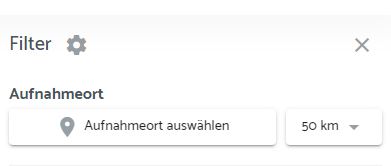
Radius search is a key feature. It shows all geo tagged images captured within a defined radius around a chosen location.
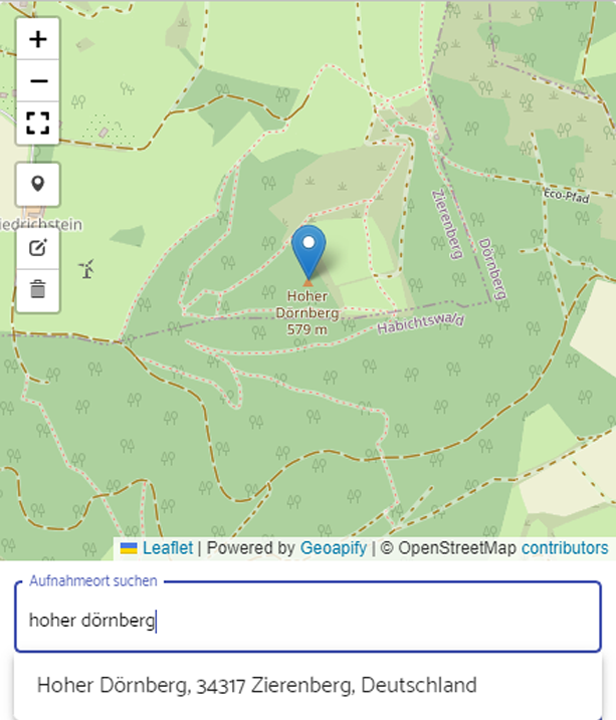
Manual entry is built for speed. No coordinates are required. The capture location can be found via text search, as shown in the screenshot. The map marker can also be positioned via drag and drop.
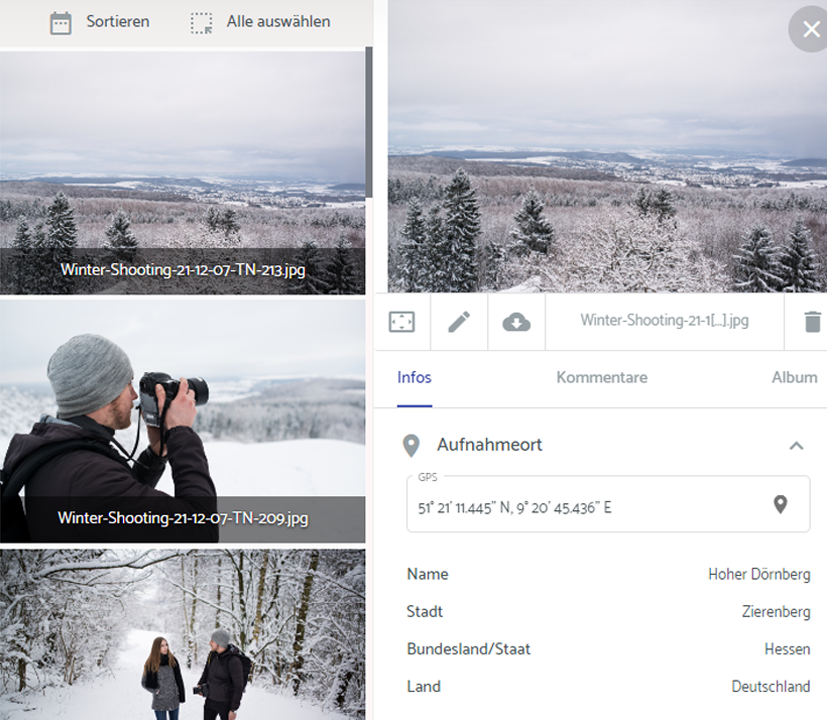
When the capture location is displayed, it is not limited to coordinates. The tool automatically enriches the entry with higher level location details:
-
city
-
state
-
country
More details are available in the helpdesk.