How to convert PNG files to JPEG
By teamnext Editorial Team
Saving as JPEG is always lossy. Visible quality loss is possible, especially with low detail elements such as text, icons, or flat color areas.
Note on file extensions:
• There is no difference between JPEG and JPG. The .jpg extension is a legacy from older Windows versions that limited file extensions to three characters.
What is a PNG file?
PNG is the most widely used lossless raster graphics format on the web. Other formats can also store images losslessly, such as TIFF, but PNG compression is particularly efficient.
PNG is well suited for:
• low detail graphics
• cutouts
• logos
• images with transparency, alpha channel
For photos, PNG is usually not a good choice.
Reasons:
• unnecessarily large file sizes
• limited metadata support, because PNG does not fully support Exif and IPTC standards
Convert PNG to JPEG on Windows
Conversion is possible with built in tools.
• Open the PNG file in Paint
• Select File, then Save as, then choose JPEG
• Set file name and location, then save
Convert PNG to JPEG on macOS
Conversion is also possible with built in tools.
• Open the PNG file in Preview
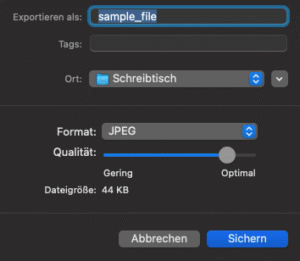
• Select File, then Export
• Choose JPEG as the format, set the quality level, then save